









Introduction
Most factory owners running two or more plants share the same quiet frustration. They have enough data to make good decisions. But that data lives in four different places at the same time.
A tally file sits in Plant A. The stores manager at Plant B maintains a separate Google Sheet. The purchase team shares updates over WhatsApp. And the weekly report lands on the owner’s desk three days after it was already irrelevant.
The question is never whether a better system is needed. What every owner really wants to know is this: what does a better system actually look like in practice?
That is exactly what this manufacturing ERP demo is designed to answer.
We at Apagen Solutions have implemented Odoo ERP across manufacturing units of all sizes and configurations. Through this blog, we are walking you through a live, screen-by-screen demonstration of how Odoo handles multi-plant operations. This walkthrough is built specifically for factories in the ₹50Cr to ₹100Cr revenue range.
No slides. No generic features list. No vague promises. Just actual screens and actual workflows. The kind of walkthrough that makes a factory owner lean forward and say, “Wait, it can actually do that?”
Let us begin.
Why Multi-Plant Operations Break Without a Unified ERP
Before we get into the manufacturing ERP demo screens, it helps to understand what we are solving for. Because the problem is not really about software. It is about how information travels across plants, and more importantly, where it gets lost along the way.
When a factory operates from a single location, coordination is difficult but manageable. The moment a second plant is added, the complexity does not simply double. It multiplies.
Communication gaps start appearing. Duplicate purchase orders get raised. Inventory sits idle in one warehouse while another plant sends urgent requests for the same item. Production delays creep in because a bill of materials update did not reach the right person at the right plant.
All of these problems share one root cause. The plants are running on separate information systems that do not talk to each other.
Here is a quick reality check for multi-plant manufacturers. Does any of this sound familiar?
- Your store managers at each plant maintain separate stock registers. Reconciling them every month is a full-time job for at least one person.
- A vendor supplies both plants. But because purchases are raised independently at each location, you are losing the negotiation leverage that consolidated volume would give you.
- The MD or COO has no real-time view of combined production status. Getting a morning update means calling each plant separately.
- Month-end closing takes far longer than it should. Finance teams are manually pulling and consolidating data from multiple plants every single month.
- Scrap, rework, and quality rejections at each plant are tracked informally. They never make it into a report that actually drives decisions.
If three or more of these match your current situation, this manufacturing ERP demo was written specifically for you.
The Manufacturing ERP Demo: What You Will See
This walkthrough is structured around five core operational areas. For each area, we show you what the Odoo screen looks like. We walk through what the factory owner or department head sees when they log in. And we explain what each feature means for the business in real, practical terms.
We are using a sample manufacturing setup modeled on a real mid-sized Indian manufacturer. The setup has two plants. Plant A handles primary production, while Plant B manages secondary processing and finishing.
Demo Screen 1: The Multi-Plant Dashboard
The first thing a factory head sees after logging into Odoo is a unified dashboard. It pulls real-time data from every plant automatically. There is no toggling between tabs and no waiting for someone to send across a consolidated report. The information is simply there on a single screen.
What makes this so significant in a manufacturing ERP demo is what it actually replaces. Most multi-plant manufacturers we work with are getting their operational snapshot from a chain of morning messages. Most of the time, that means a photo of a whiteboard from one plant manager, a typed summary from another, and a shared spreadsheet that may or may not have been updated by whoever managed it last.
All of that changes with a single login. The owner can instantly see production orders in progress at both plants, stock levels per warehouse, and which purchase orders are still awaiting approval. Everything is live and filterable by plant, date, or product. And nothing requires a phone call.
Demo Screen 2: Inter-Plant Inventory Transfer in 3 Steps
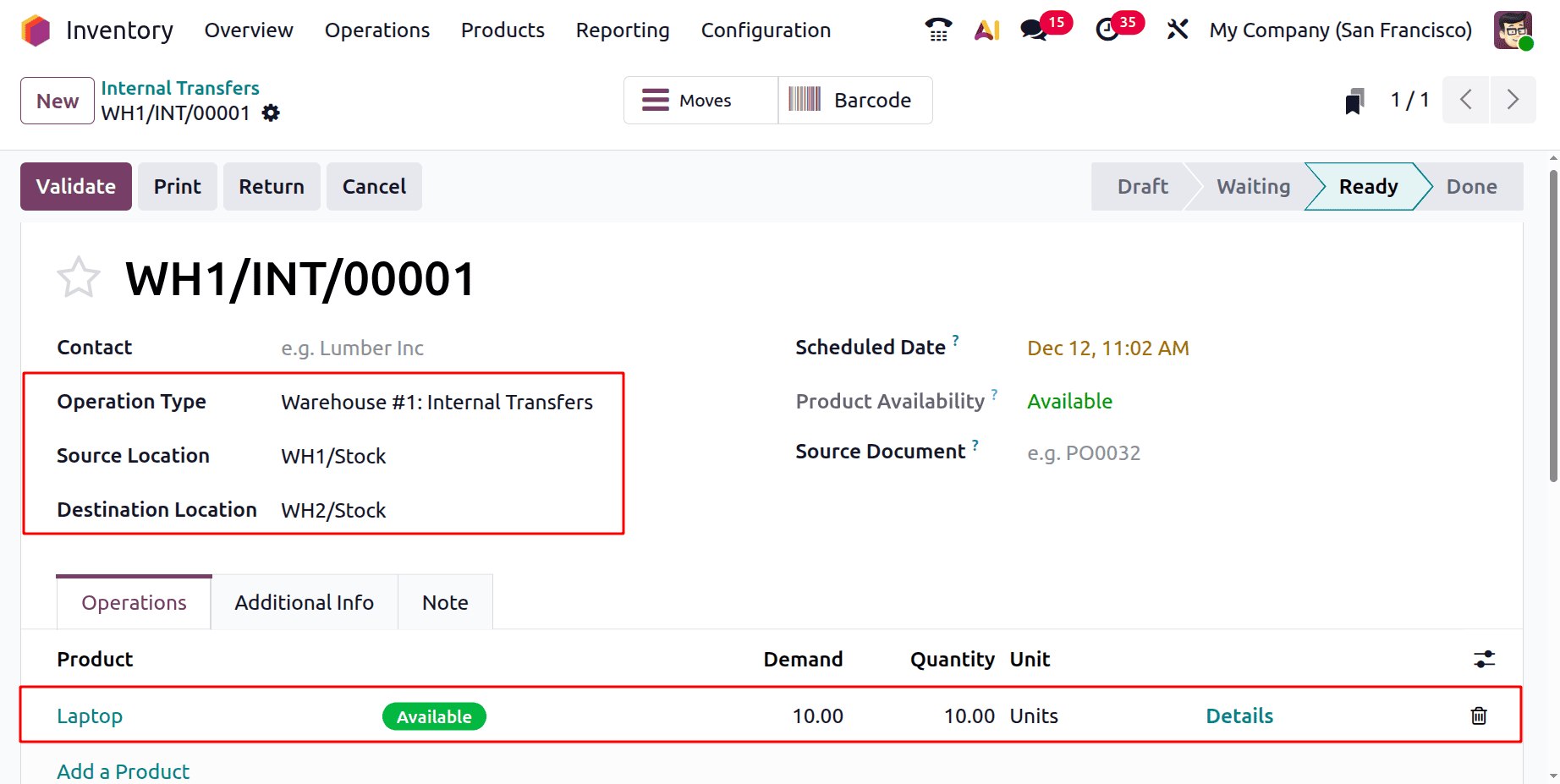
Here is a scenario that plays out repeatedly in multi-plant manufacturing operations. Plant A is running low on a raw material, while Plant B has a surplus of the same item sitting in its warehouse.
In a manual setup, this discovery usually happens through a phone call. The transfer happens only after someone physically goes and verifies the stock. A challan is raised manually. The ledger update happens at the end of the week when the accounts team finally gets to it.
In this manufacturing ERP demo, the same process runs very differently inside Odoo.
The store manager at Plant A raises an internal transfer request directly in the system. That request carries all the key details: the item, the quantity needed, the source location at Plant B, and the destination at Plant A. Upon receiving an automatic notification, the store manager at Plant B validates the available stock and confirms the transfer with a single click.
Odoo automatically updates the stock ledger at both locations, triggers the relevant accounting entries, closes the request, and stores a complete audit trail.
Three steps. Zero phone calls. The accounts team did not have to do a single thing manually.
This is what we mean when we say that a manufacturing ERP demo shows you things that a features slide simply cannot. The workflow itself is the proof.
Demo Screen 3: Consolidated Production Planning Across Plants
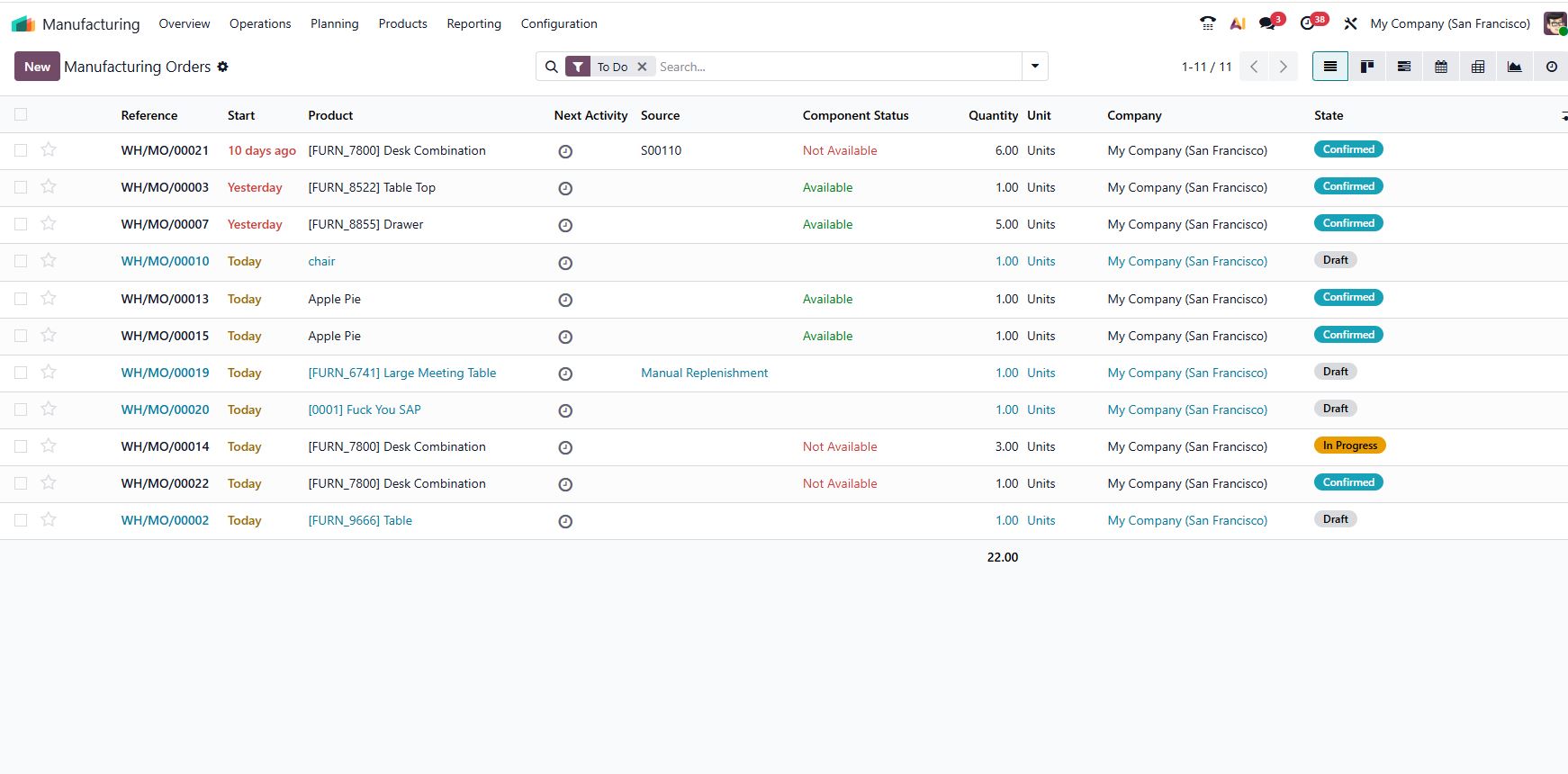
Production planning for a multi-plant setup is where most manufacturing businesses hit a very real wall. When Plant A handles casting and Plant B handles finishing and assembly, every work order at each stage is dependent on the previous one. A delay at Plant A creates idle time at Plant B, and a capacity overload at Plant B creates a growing backlog of semi-finished goods piling up at Plant A.
In this section of our manufacturing ERP demo, we show how Odoo’s MRP module, which stands for Material Requirements Planning, handles this dependency in a structured and intelligent way.
The production head can view all manufacturing orders across both plants in a single list. Work centers are mapped to their respective plants from the beginning. So routing becomes automatic. When a job is created for a finished product, Odoo already knows that Stage 1 runs at Plant A and Stage 2 routes to Plant B. It plans the sequence accordingly without any manual intervention.
Beyond planning, the system also flags capacity conflicts before they turn into problems. If Plant B’s finishing line is booked to full capacity for the next six days, the MRP surfaces that constraint immediately when the production team tries to schedule a new order. Instead of discovering the issue on day five when nothing can be shipped, the team is made aware on day one.
The result is a planning layer that the owner and production head can genuinely trust. Because it is drawing from actual capacity data and actual material availability, not from someone’s best estimate on a shared spreadsheet.
Demo Screen 4: Plant-Wise Profitability and Finance Consolidation
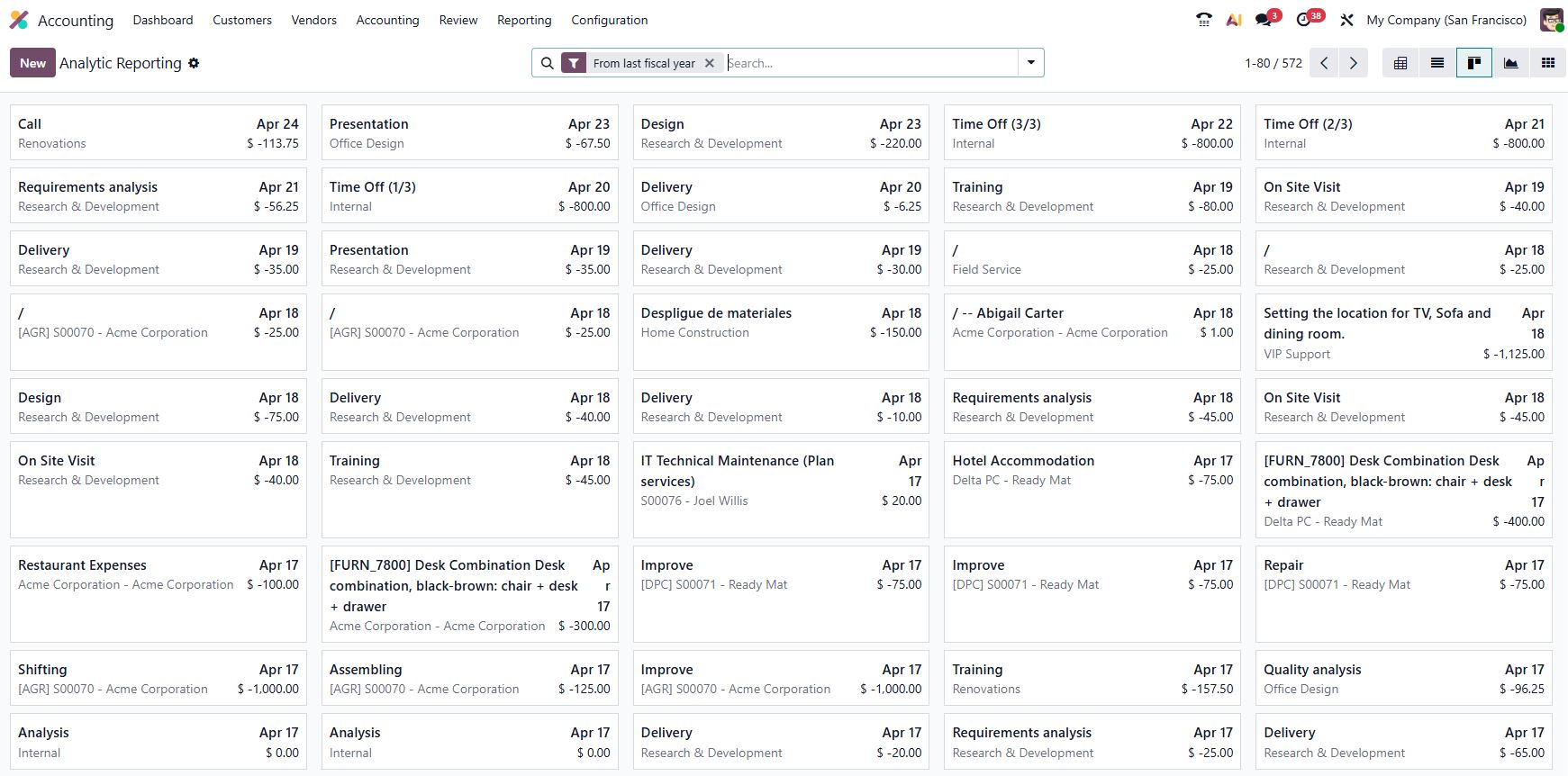
One question comes up in almost every manufacturing ERP demo we conduct for mid-sized factory owners. It is this: which of my plants is actually profitable?
It sounds like a straightforward question. In reality, for a factory without a proper cost center structure in place, answering it accurately can take the finance team two to three weeks of manual work at the end of every quarter.
Odoo solves this problem through analytic accounting. Each plant is mapped as a cost center from the start of implementation. Every transaction is tagged to the appropriate cost center at the point of entry. This applies to raw material purchases, salary entries, utility bills, and finished goods sales alike. By the time month-end arrives, the system has already done all the consolidation work in the background.
The factory owner simply logs into the analytic report and selects both Plant A and Plant B. They see a clean comparison of revenue, material costs, labor costs, overheads, and gross margin per plant for any date range they choose. No manual consolidation. No waiting for the accounts team to compile numbers from multiple files.
For a ₹50–100Cr manufacturing business, this single capability alone often justifies the full ERP investment.
Demo Screen 5: Centralized Purchasing with Plant-Wise Delivery Control
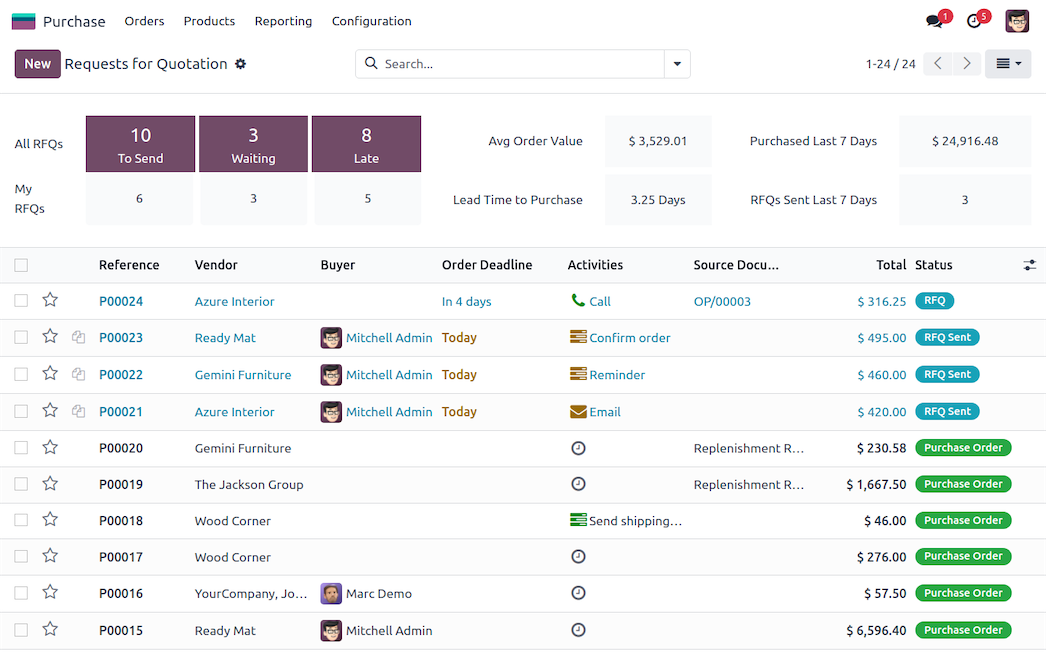
Purchasing is an area where multi-plant manufacturers quietly lose a significant amount of money every year. When each plant runs its own purchase function in isolation, several problems emerge at once.
The business loses consolidated volume negotiation power with vendors. Duplicate orders get raised at two plants without either team knowing. Vendor performance tracking becomes inconsistent across locations. And approval hierarchies end up being informal, which means large purchases sometimes go through without the right sign-off.
In this manufacturing ERP demo, the purchasing process works from one centralized system. All requests for quotation, purchase orders, and vendor communications flow through a single platform. This happens regardless of which plant placed the original requirement.
The purchase team creates a single PO and selects the appropriate delivery address, which can be Plant A or Plant B. The system routes the delivery to the correct location. Multi-level approval workflows are configured based on order value thresholds. So a purchase above a set amount automatically goes to the CFO or MD for approval before the vendor is engaged. Every approval step is logged, timestamped, and fully traceable.
Over time, the business gains the ability to compare vendor prices across all orders, track on-time delivery performance by supplier, and make procurement decisions based on real data rather than long-standing relationships alone.
What This Means for a ₹50–100Cr Factory
Going through a manufacturing ERP demo is one thing. Translating those screens into real business outcomes is another conversation entirely.
Here is what our clients in the ₹50–100Cr revenue range consistently report after going live on Odoo with a multi-plant configuration.
Inventory carrying costs come down. This happens because stock is now visible across all plants in real time. Inter-plant transfers happen proactively rather than reactively. Excess stock at one location no longer sits idle for weeks before someone notices it.
Month-end financial closing compresses significantly. Closings that previously took 12 to 15 working days often come down to 3 to 5 days. The data consolidation has been happening throughout the month inside the system. There is very little left to do manually by the time month-end arrives.
Production delays caused by missing materials or capacity conflicts reduce in frequency and severity. The planning module surfaces these issues before they cascade into shop floor disruptions. Teams have time to respond rather than react.
And perhaps most meaningful for the business owner personally: the shift from managing operations through intuition and informal updates to making decisions backed by live data is a change that touches every department across every plant.
Is Odoo the Right Fit for Your Plant Scale?
Not every ERP fits every business. Here is a quick self-check to help you decide whether it is worth booking a manufacturing ERP demo with us.
- We operate from two or more plant locations and struggle to get a consolidated operational view across them.
- Our inventory reconciliation between plants is done manually and takes considerable effort every single month.
- Our purchase function is decentralized, and we are not confident we are getting the best vendor pricing.
- Our production planning is largely informal, and capacity conflicts tend to surface too late to address without disruption.
- Our finance team spends a significant number of hours manually compiling plant-wise reports each month.
If four or more of these apply to your business today, you are genuinely ready for a live manufacturing ERP demo configured to your specific setup.
Why Apagen Solutions
We are an Odoo Silver Partner with deep experience in manufacturing ERP implementations. Our project portfolio spans process manufacturing, discrete manufacturing, construction, healthcare, and media industries. We have worked with businesses ranging from single-plant SMEs to multi-location mid-market manufacturers operating across multiple states in India.
What makes our manufacturing ERP demo experience different from most vendor walkthroughs is the preparation that goes in before the demo begins. We take the time to understand your plant structure, your product categories, and your key workflows in advance. So what you see during the session reflects your actual business scenario rather than a generic one.
Our implementations for the ₹10 lakh to ₹35 lakh investment range are structured with phased rollout plans. These plans are designed to minimize operational disruption while delivering clear, measurable outcomes from the very first go-live.
Ready to See Your Plants Inside Odoo?
The screens in this manufacturing ERP demo represent only a portion of what Odoo manages across a full multi-plant operation. Quality control, scrap management, shift-wise production tracking, GST-compliant invoicing, and HR and payroll per plant are all part of the same connected ecosystem.
If you are a factory owner or a senior decision-maker running a ₹50–100Cr operation across multiple locations, we would like to show you what your own business looks like inside Odoo.
Book a free 45-minute live manufacturing ERP demo with our team at Apagen Solutions. We will configure the walkthrough to your plants, your product mix, and your actual operational challenges. You will walk away with a clear and honest picture of what Odoo can realistically do for your business.
Book Your Free Manufacturing ERP Demo
Or reach us directly at +91 9971 800665